


For developers relying on the Codex command-line interface to execute extensive refactoring or long-running automation tasks, a familiar frustration often interrupts the workflow. Initiating a complex codebase restructuring, walking away for an hour, and returning only to discover that the session has ground to a halt due to an abrupt usage limit wall has become a common developer grievance.
When a session stalls mid-process, engineers are forced to manually calculate when their rolling five-hour window resets, set reminders to return to their workstations at precise times, and manually re-engage the process by typing commands to continue. If a weekly quota has been completely exhausted, the enforced downtime can stretch across multiple days. Compounding the annoyance, developer accounts frequently hold unused reset credits that quietly expire in the background without ever being utilized.
To eliminate this productivity friction, independent developer Ercan Atay has engineered Cybokron Limit Guard, a free and open-source macOS menu bar application designed to automate the recovery process safely. Rather than serving merely as an announcement for the utility itself, the development of Limit Guard offers a compelling look into the technical mechanics of local developer tooling, examining where Codex exposes necessary system signals, why traditional keystroke automation was bypassed in favor of native APIs, and the essential guardrails required when building autonomous tools that interact with AI agents.
Where the Signals Live
Modern developer tools often obscure their internal states, but Codex exposes almost everything required for local monitoring through two primary, accessible sources.

The first source is Codex’s own local application server, accessible via codex app-server. This interface communicates using newline-delimited JSON-RPC protocols. By querying the account/rateLimits/read endpoint, applications can retrieve precise data regarding both five-hour and weekly usage windows, including exact usage percentages, countdowns to reset times, and a critical boolean field designated as ordinaryUsageAllowed. Furthermore, this endpoint enumerates any available usage-limit reset credits associated with the account, providing individual identifiers, current statuses, and strict expiration dates. Because this underlying protocol is officially classified as experimental by its maintainers, developers building atop it must treat every incoming field defensively.
The second crucial source of operational data resides within the local session logs. Each active Codex session continuously writes JSONL rollout files stored securely within the ~/.codex/sessions/ directory on the local machine. Within these files, every completed conversational turn concludes with a distinct task_complete event. When a specific turn is prematurely cut off due to resource constraints, its corresponding error payload carries an explicit usage_limit_exceeded flag.
This specific programmatic distinction is what separates a routine agent completion from an unexpected operational interruption. Because normal task conclusions, sudden overload errors, and manually aborted turns each manifest with distinct signatures, monitoring software can accurately identify why a session stopped without having to rely on guesswork or brittle screen-scraping heuristics.
Don’t Trust the Clock, Trust the Gate
Initial architectural concepts for automated recovery utilities often lean toward simplicity: read an anticipated reset timestamp from an API response, configure a background system timer, and automatically dispatch a continuation command the moment the timer expires. However, relying purely on chronological assumptions introduces significant risks, a caveat explicitly noted within Codex’s own interface schemas, which caution that external clients must never attempt to infer recovery solely from usage percentages or arbitrary reset timestamps.

Consequently, within Limit Guard’s architecture, a forecasted reset time serves only one limited purpose: it schedules the very first preliminary check. The absolute gatekeeper for any subsequent action is the verification of the ordinaryUsageAllowed status flag returned by a fresh API read that is less than thirty seconds old. If this crucial boolean value evaluates to false, the monitoring software continues its background polling routine utilizing an adaptive back-off schedule.
If the returned value returns null or cannot be successfully decoded, the application refrains from taking any action. Polling intervals dynamically adapt to circumstances, checking every five minutes under normal operating conditions, escalating to every minute once a usage window crosses the ninety percent threshold, and narrowing down to every thirty seconds immediately following a documented reset event.
No Keystrokes
When contemplating how to programmatically resume a halted terminal session, the most direct approach might appear to involve automating the macOS Terminal application via AppleScript or generating synthetic keyboard events. While such pathways can be prototyped rapidly, they introduce severe operational vulnerabilities. Injecting raw keystrokes blindly into a terminal window that may not be fully visible or focused carries high risks; a stray command could inadvertently confirm an unintended option picker or corrupt a half-written prompt.
Codex provides a much cleaner, programmatic alternative through its ecosystem architecture. Because a local Terminal session communicates directly with a shared application-server daemon, external scripts can leverage codex app-server proxy to interface safely with that exact same background daemon. Initiating a turn/start call paired with a specific thread identifier successfully launches a new turn within that exact conversation, rendering the output natively in the user’s Terminal tab.

This mechanism preserves the existing thread’s underlying model selection, approval parameters, and sandbox configurations because the managing application never overrides them. As a direct result, the utility requires no intrusive macOS Automation or Accessibility permissions to function. Should the local daemon become unreachable, the software deliberately avoids falling back to risky keystroke simulation, instead simply prompting the developer to intervene manually.
Every automated continuation request carries a fresh client user message identifier. Within a two-minute window, the application checks for the appearance of this identifier or a newly registered turn within the target thread. If delivery cannot be definitively confirmed, the attempt is flagged as unconfirmed and is never automatically re-sent, preventing accidental loops. Instead, the user is presented with a manual send option.
To maintain natural conversational context, messages are dispatched in the language natively used within that specific thread. Apple’s built-in NaturalLanguage framework analyzes recent user messages while intentionally stripping out injected background context such as configuration documentation, determining whether to output a standard English "continue" or its localized equivalent. The internal mapping table remains fully editable, allowing developers to incorporate additional languages as needed.
Guardrails for an Agent That Talks to an Agent
Deploying automated software capable of communicating with an artificial intelligence agent on a user’s behalf introduces subtle risks, necessitating a design philosophy centered primarily on restraint and fail-safe boundaries. The majority of the system’s logic is dedicated to identifying operational conditions under which the software should deliberately refuse to act.

Reset Credits, Handled Carefully
Certain user accounts periodically receive usage-limit reset credits that carry strict expiration dates. Limit Guard aggregates these credits, displaying their respective expiration timelines and prioritizing those expiring within a twenty-four-hour window. Any manual attempt to consume a credit always prompts the user for explicit confirmation before proceeding.
Automated consumption features remain strictly deactivated by default. When explicitly enabled by the user, the application is permitted to expend a single credit only when the weekly usage limit breaches a defined threshold—preset to ninety-seven percent by default. This automated expenditure can occur at most once per account every seven days, functions exclusively while Codex is actively engaged by the user, and is strictly prohibited if the standard weekly window is scheduled to reset autonomously within the next twelve hours. When a credit must be spent, the system consistently prioritizes the token closest to its expiration date.
Interactions involving financial or resource-based consumption endpoints demand rigorous idempotency. Prior to executing a consumption API call, the application commits a local ledger entry tied to a unique UUID idempotency key. If network timeouts occur or the application terminates unexpectedly, subsequent retry attempts utilize the identical idempotency key, ensuring that a single intended reset can never inadvertently trigger multiple deductions. Comprehensive test suites validate every expenditure pathway against a simulated local application-server environment, ensuring production endpoints are never unnecessarily pinged during testing phases.
Forecast and History
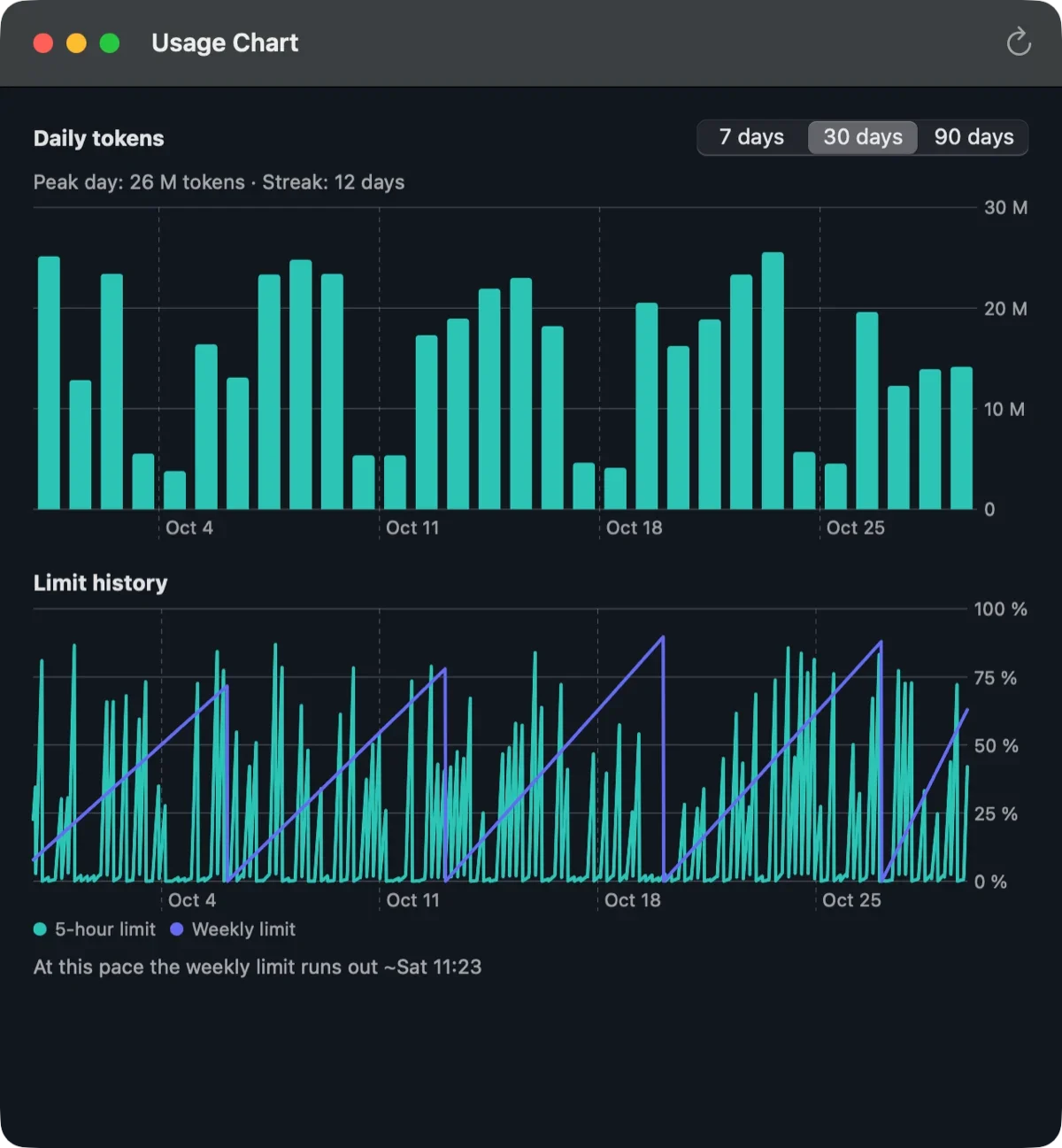
Beyond simple automated recovery, the utility processes recent usage metrics to project consumption velocity across active windows, generating predictive forecasts such as estimating when weekly limits will exhaust based on current working speeds. Additionally, integrated visual charts map out daily token utilization spanning historical periods of seven, thirty, or ninety days, alongside comprehensive logs tracking the historical behavior of both short-term and long-term usage windows.

Privacy
Designed with local data sovereignty as a primary constraint, all operational data remains securely stored on the host Macintosh computer. The application accesses local session files solely to detect task terminations and identify the predominant language of the conversation. It never copies proprietary conversation text into secondary storage files, never reads sensitive Codex credential files, and incorporates zero third-party analytics telemetry. Network communication is strictly confined to local queries directed at the Codex application-server daemon and occasional checks against GitHub for software updates.
What the First Version Covers
Version 0.1.1 provides native support for the Codex command-line interface operating within Terminal.app on macOS 14 Sonoma or newer releases, featuring a universal binary optimized for both Apple Silicon and Intel architectures. Users must maintain an active authentication session with ChatGPT via standard command-line login procedures. The graphical interface is currently available in both English and Turkish localization options. Future roadmap items include expanded support for alternative terminal emulators, code editors, the native Codex desktop application, concurrent support for multiple user accounts, and compatibility with other developer-focused AI agents such as Claude Code.
Developers should note that automation utilities do not circumvent underlying platform usage limits; they merely wait until official system metrics confirm that usage is once again permitted, or safely leverage pre-existing account credits. Because automated interactions may occasionally interact with platform terms of service depending on provider updates, users are advised to review relevant guidelines prior to enabling autonomous actions.
Try It
Built natively in Swift utilizing AppKit and SwiftUI frameworks without relying on third-party dependencies, Limit Guard is fully notarized by Apple and distributed freely under the terms of the MIT open-source license. The software is available for download directly from the official project website, while the complete source code is hosted on GitHub for public review, community contributions, issue tracking, and peer collaboration.



Comments (0)